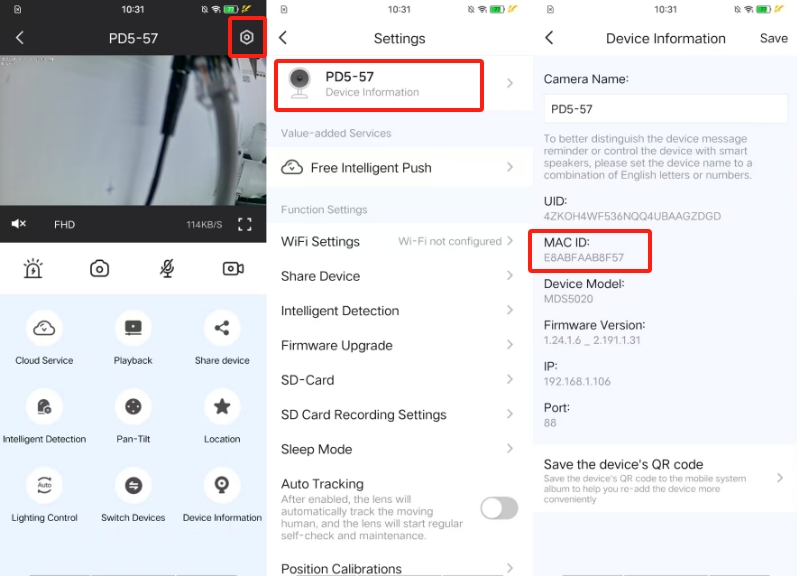
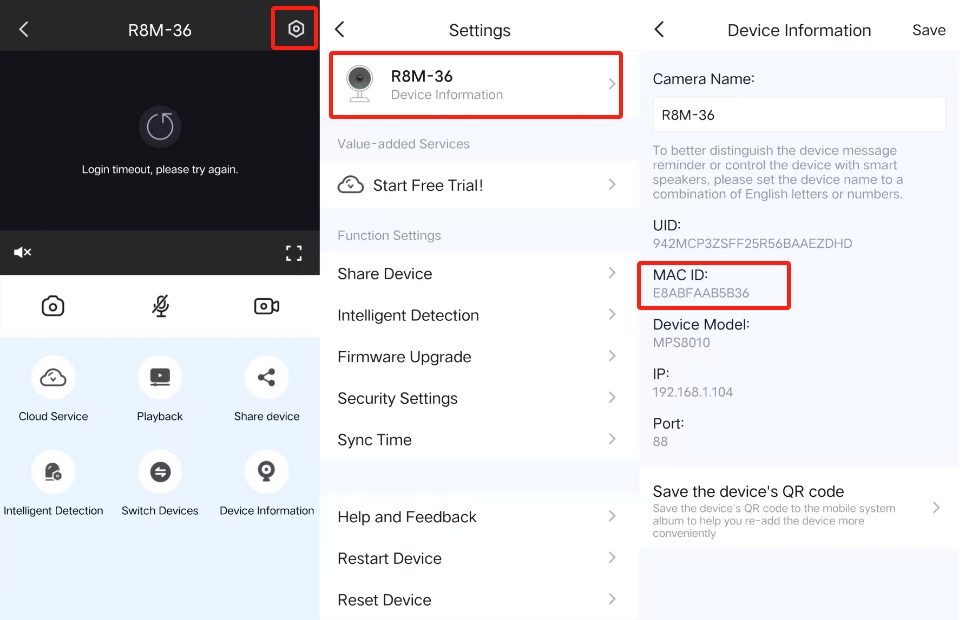
Step1: Open live video page.
Step2:Tap on device information
Step3: Find mac id and uid info under Device Information.
Step4: You can copy camera mac id and uid by using your finger to touch the mac id and uid info.
Tips: when camera is offline, after you open settings page, only parts of setting options appear. Also, when you go to device information page, firmware info won't appear. When camera is offline, you can do nothing for the camera, such as reboot or reset the camera.
Only when camera is online, you can use Foscam VMS to find camera mac id and uid.
Step1: Open setup of the camera via Foscam VMS.
Step2: Go to Device Information page
Step3: Find mac id and uid info under Device Information.
Step4: Select mac id or uid and right click your mouse, choose copy option then you can copy mac id or uid info.
Was this article helpful?
Contact information
Full name *
Email *
Telephone number
Camera model
Help Topic *
Ticket Details
Please describe your problem as detailed as possible so that we can assist you in the best possible way
Title *
Submit