1. Please refer to https://www.foscam.com/faqs/view.html?id=323 to see if you can find the camera in local network while phone connect home wifi.
2. If you can see the camera on "Find My Device" page but still can't connect to it, please clear app cache and try again, if issue remains, please uninstall Foscam app and re-install it.
3. If you can't find the camera on "Find My Device" page. Please see below.
a. If phone is iPhone, please open iPhone Settings-->Apps-->Foscam-->Local network and enable it. After that, you can see if camera shows on "Find My Device" page
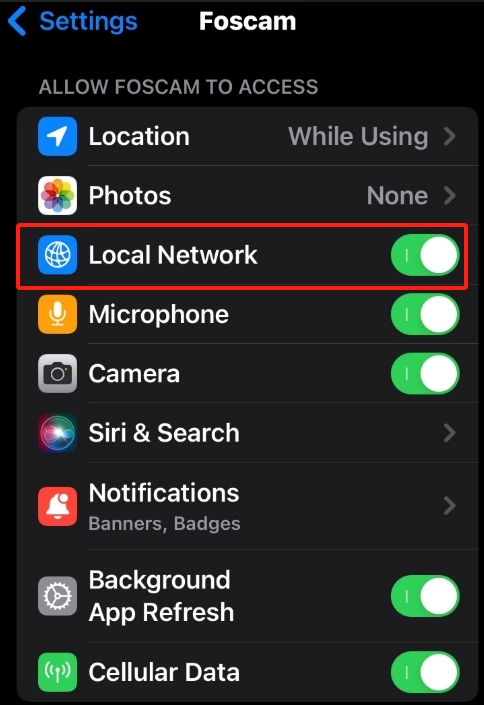
b. If still can't find the camera on "Find My Device" page, please refer to https://www.foscam.com/faqs/view.html?id=274 to re-configrure wifi for cameras.
Warm tips: If you have ever changed home network, such as Internet supplier, router, modem, wifi SSID or password, camera won't connect to wifi any more unless you re-configure wifi for it manually.
Was this article helpful?
Contact information
Full name *
Email *
Telephone number
Camera model
Help Topic *
Ticket Details
Please describe your problem as detailed as possible so that we can assist you in the best possible way
Title *
Submit